Publish turns your prototype into a link. Whoever you send it to opens it with the free Prototo app on their iPhone and runs the real thing natively, taps, animations, and all. No Mac, no Xcode, no code on their side.
Click Publish
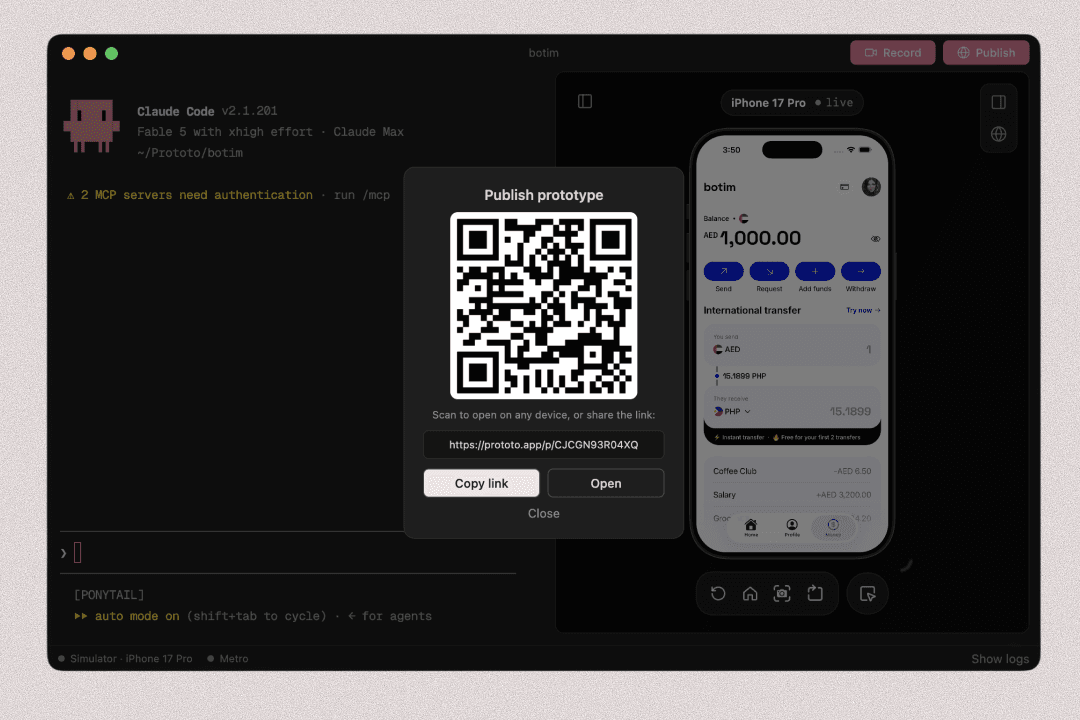
Click the Publish button in the top right. That is the whole flow: Prototo publishes your prototype and shows the link and QR code right in the app, with a Copy button. Closed the dialog? The QR button next to Publish brings it back any time. The first time, Prototo signs you in so your shares are saved to your account (see Your account). Your prototype is published to the cloud, so the link keeps working after you close Prototo.
Your share page
Anyone who opens the link in a browser sees your prototype on its share page, with a picture of the screen you published from. If you’ve also exported your flow (Export flow in Prototo Desktop’s Flow view), the page links to it: a canvas with every screen in a phone frame, laid out in the order they link, that anyone can zoom into. See Prototo Desktop.
What the other person does
- Get the free Prototo app from the App Store and sign in. Takes a minute, once.
- Open your prototype any of three ways: tap the link, scan the QR code with the iPhone camera or the app’s Scan tab, or just copy the link. Prototo spots a copied link and offers to open it.
The prototype downloads in a few seconds and runs natively on their device.
If they open the link in a regular browser instead, the page walks them through getting the app.
Name your share
Prototo asks what to call you the first time and remembers it. To change it, choose Prototo › Change Name… in the menu bar.
Re-share after changes
Click Publish again any time. Your project keeps the same link, so you can resend the original URL and people see your latest version.
When Prototo itself gets a new version, the app updates your project the next time you open it. Click Publish once more so the link opens on the new Prototo app. Until you do, people who open it see “this prototype needs an update”, and you get one email about it.
On the Free plan, your first publish starts a 7-day Publish trial. After it ends, upgrade to Plus to publish new links. Links are permanent: everything you published stays live either way, and re-publishing a link you already shared works on every plan. See Plans and limits.
Want a teammate to build on it?
On a Team plan, teammates can remix your prototype: they get their own copy to keep building, with its own link. See Remix a teammate’s prototype.